Pocket App By Meta – Free Apk Download For Android 2026
Meta
August 4, 2026
125MB
v1.2.3 (2026)
Android 10+
100K

Description
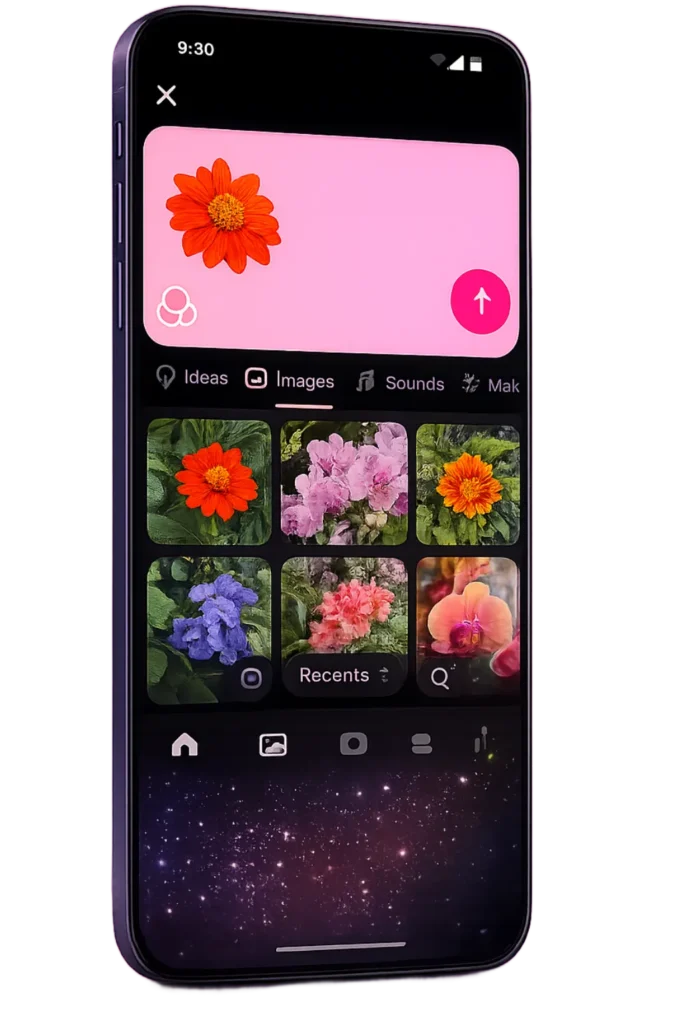
Are you bored of outdated and boring meta-apps and want to experience something unique and refreshing then you are at your desired place. We are here with an amazing meta app named pocket app where you can make, share and explore gizmos with your friends. A gizmos is a short, engaging, and ready to play AI built experience. You can also create your own gizmos by typing a description but the plus point is that you can also engage with gizmos created by other people .

If you want to make use of this amazing tool then what are you waiting for just login to your existing meta account and if you are new then don’t worry this article will help you create a new account.
How Gizmo Works on Pocket apk?
When you open the pocket you will find gizmos in your feed where you can interact freely and To play you can tap one or follow the instructions given below.
- You can drag, swipe and tap things on screen.
- Gizmos also let you save photos if you have allowed pocket access to your camera.
- To move things around you can tilt or shake your phone.
- While interacting at gizmos you can enjoy your favorite music and sound effects.
- You can also use microphone to speak while interacting. if the pocket have access to your microphone.
How To Create a gizmo on Pocket
The most fascinating thing about this app is that you can build your own gizmos by describing what you want. The pocket AI generates the experience from the description you have provided. Furthermore before you post, you can choose whether to let other users remix your creation and share their own version.
- Open Pocket
- Tap Create
- Describe what you want to create by add more detail for better results
- Tap Next
- Switch, remixing on or off
- Tap Post
You can post your gizmo publicly on Pocket apk or send a direct link to friends. It is not necessary to have a pocket app to view the link you have shared with your friends. If you allowed the remixing option then anyone can remix your gizmos and share their version even on other meta apps and if you deleted your post then it will not effect the other remix.
How Meta uses your information on Pocket Meta?
When you use your meta account to sign in then meta uses some of your account details to personalize your experience and keep the platform safe and following its standard privacy policy.
The data which pocket uses is given below:
- Your login credentials
- Your account ID
- Your name and username
- Your profile details, like your picture and bio
- Your age
- Your history of Community Standards or IP violations
Note: Information relating to your Pocket profile will be processed in accordance with Meta’s Privacy Policy. The Meta Terms of Service apply to your use of Pocket.
More Information about Pocket By Meta
If you want more knowledge about pocket then you can go through the articles given below:
The first thing you have to do to use a pocket account is use your existing meta account to sign in but if you do not have any existing account then you have to create one.
How To Create a Pocket profile?
Below is the process through which you can sign into a pocket app using a existing meta account:
- Download and open Pocket
- Tap get started then select your existing account
- Log in following the prompts
- Set up a Pocket username and enter your name
How To create a new Meta Account and sign into Pocket?
- Download and open Pocket
- Tap get started
- Enter your phone number or email, then tap continue
- Follow the steps to create your Meta account
- Set up your Pocket username and name
How your Pocket username and your name appear on Pocket meta?
- Your Pocket username is very important because it shows who you are on pocket.
- Your profile pages also displays your name to others.
How You Can Edit an existing Pocket profile?
You can edit your Pocket profile using the following steps
- Tap profile
- Tap edit profile
- Update your photo, name, username, or bio
- Tap save changes
Deleting a Pocket profile
If you want a break or due to other reasons you want to delete your pocket profile, then simply you need to delete your entire meta account.
How You Can Report a gizmo on Pocket App?
If you think any gizmo is against of our community standards then you can report it and pocket will remove it from your feed.
To report a gizmo
- Open Pocket
- Tap the menu icon on the gizmo
- Tap report post.
- Pick a reason
- Choose the scenario that fits best
- Follow the prompts
You can check your email after submitting the report for updates on your report
How To Report a comment on Pocket Apk?
There is same rules foe the comments too. If any comment breaks the society rules then you can report comment too. One’s you report a comment you won’t see it anymore.
To report a comment on Pocket:
- Press and hold the comment
- click on report
- Choose a reason
- Select the matching scenario
- Follow the remaining steps
After reporting the comment the status on your report will be sent to your email.
How To Block someone on Pocket Games?
You can also block people who you do not want to interact on pocket. When you block someone you stop them from
- Seeing your profile
- Viewing your gizmos in the Feed
- Tagging your username
- Finding you in search
- Seeing your comments elsewhere
- Pocket don’t notify someone when you block them.
How To block a profile on Pocket App by meta?
You can block people from there pocket profile:
- Tap report while viewing their profile
- Click on block
- Confirm by tapping block again
You can block people from your feed:
- Tap the menu icon next to their name on a gizmo
- Then click on block
How To unblock a profile on Pocket Meta?
- Tap on profile
- Click on setting
- Go to blocked, then tap on unblock next to their name
Frequently Asked Questions
What is Pocket App?
Pocket is an AI app from Meta Platforms that converts text prompts into small interactive experiences called gizmos.
Is Pocket Meta free?
Yes, it is free to download and use but you need a Meta account is required to sign in.
How do I register?
Signing in with an existing Meta account, or creating a new one inside the app, counts as registration.
How do I log in?
Open the app and sign in with existing Facebook or Instagram credentials because Pocket runs on the same Meta account system.
Is Pocket Meta available on Android?
Yes, it is published on Google Play in some regions like us and uk.
Can I use Pocket Meta on iPhone?
Yes, it is also listed on the Apple App Store, subject to the some region only.
Is Pocket Meta secure?
It is distributed only through official app stores and discloses its data practices, including encryption in transit and the option to request data deletion.
Conclusion
Pocket App is Meta’s new AI app which turns text prompts into small interactive gizmos you can create, explore, and share. It ties into your existing Meta account rather than a separate login. It is free to use but still rolling out region by region, so Android and iPhone availability depends on where you are. The safest way to get it is straight from the official App Store or Google Play listing Through our Official and Safe Website (apktower.com.pk).